Bulin 47 AI Video Audio: What to Check Before Sharing
Understand the difference between an image, a soundtrack and an original performance. Review sound carefully before posting a freestyle video.
Preview: image preparation and Waffo payments are available. Public video generation remains closed during validation; purchasing does not unlock it.
Bulin 47 AI video audio deserves its own review: a familiar soundtrack, moving lips and a playable file are separate things. This guide explains the current sound direction and a practical way to check what you actually hear and see.
Bulin 47 AI video audio starts with separate checks
Review audio as carefully as the visible performance. An image provides appearance and composition; it does not supply a recording, a music license or a voice performance. Bulin 47 Video uses one authorized image with product-written original motion instructions.
There is no user audio upload, song selector or voice-cloning feature. In the current approximately 20-second, 768P workflow, H3 receives your photo and fixed text instructions. After generation, the site replaces the generated sound with an authorized original soundtrack. That postprocessing does not change the mouth movement to match it. Waffo purchases are available, but public generation remains closed during validation.
Original motion and original sound are separate
People searching for Bulin 47 AI videos may want the familiar song or the original performance. Our product takes a different creative route: original freestyle motion from a starting image. It does not offer voice cloning or guarantee exact choreography.
Soundtrack replacement is a separate step after video generation in the current workflow. It can supply the chosen recording without proving that the visible performance matches its words or beat. Full listening and motion-to-audio timing checks remain necessary before approving the result.
This distinction gives you a clear planning decision: choose the image for the visual concept, and assess sound separately. Avoid building a campaign around a particular song unless you have an appropriate way to use that song and the relevant permissions.
Listen to the whole clip
Review with headphones or clear speakers in a quiet setting. Start at the first frame and listen through the ending. Notice whether an unexpected word, voice, melody or abrupt sound appears only in the middle or final seconds.
Check the relationship between audio and movement. A moving mouth does not establish accurate lip sync. A smooth image does not establish acceptable audio. If audio is unsuitable, do not publish the video unchanged merely because the visual looks good.
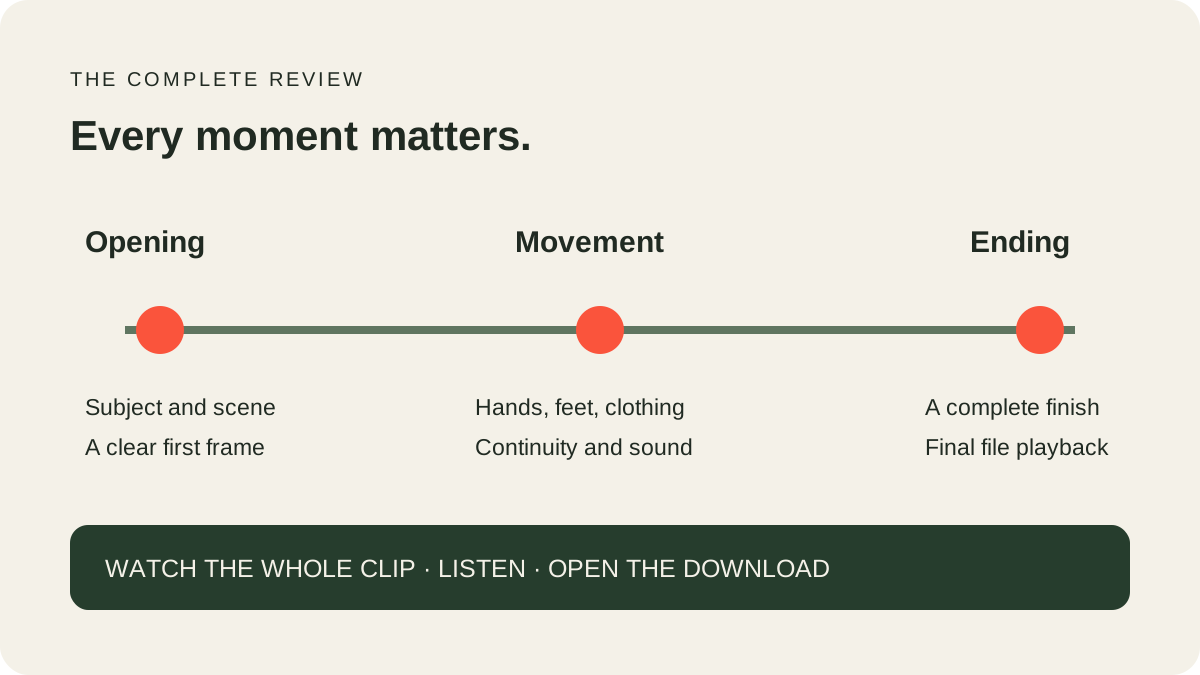
Use the same file you intend to post for the final check. A browser preview, a downloaded file and a later edited version can have different playback behavior. If you add permitted sound in another editor, review that exported version from beginning to end as well.
Plan music for the destination
A social platform may provide its own music selection. Check the platform's current guidance for your account type, country and intended use. The presence of a track in an app does not establish rights for every export, advertisement or commercial project.
Keep track of the recording and license you actually use. If the video will be used commercially, review whether the permission covers the relevant media, territory and campaign. For uncertain rights, choose material with clear permission or obtain qualified advice specific to the project.
Our site does not provide a licensed music catalog. It also does not convert a photograph into an authorized imitation of a real person's voice. Keep the creative premise original and label synthetic content where the destination requires it.
Know what the content checks cover
Uploaded images and product motion text receive automated checks before generation. Sampled output video frames are checked before private delivery. Those visual checks are useful safeguards, but they do not review every moment of sound or establish copyright and likeness rights.
If you notice harmful or infringing content, use the public reporting channel. Reports are acknowledged within two business days, with an outcome usually provided within five business days; urgent safety or infringement risks receive priority. Do not include passwords or private access tokens in a report.
Keep the last review simple and complete
Image, movement, audio, file. Check all four. Start with the one-photo walkthrough, then read the video review and sharing guide before the final handoff. The Pricing page describes video packs and current availability; music rights still need a separate review.
For a complete posting plan, combine this sound review with our TikTok and Reels preparation guide.
Check the soundtrack, timing and continuity separately
The current workflow creates the visual performance first, then replaces its sound with the fixed authorized recording. This preserves the choice of soundtrack without asking the model to generate the recording. It does not make the model's existing mouth shapes or gestures match the recording. Timing therefore needs its own honest review, even when the sound is the expected track.
Start the audio review at ordinary playback speed. Listen for a complete opening, an uninterrupted middle and a natural ending. Note any audio dropout, distortion, sudden volume change or unexplained sound. Then watch again while concentrating on the mouth and nearby hand gestures. A head turn may temporarily hide the lips, so use more than one visible moment to assess timing.
Do not confuse several observations. Hearing a recognizable phrase does not prove that the entire reference was retained. Seeing the mouth open on a beat does not prove the mouth matches the words. A file can pass the simple check “has audio” and still fail your creative review. Keep separate notes for audible content, rhythm, mouth movement and playback quality.
For a useful issue report, record the time range and what changes. “Sound stops from eight to nine seconds” is actionable. So is “The mouth holds a smile while the voice continues.” Avoid calling a clip precisely synchronized based on one attractive frame. The same review standard should apply to our current workflow and to any competitor example you compare it with.
If your goal needs another soundtrack, consider the effect on the entire piece before replacing audio in an editor. New words will not automatically produce matching mouth shapes in the existing video. You may prefer a different creative concept or an instrumental treatment that fits the visible movement. Save the original output separately, then replay the edited export on the device where you intend to publish it.
Frequently asked questions
Will I get the original Bulin 47 sound?
The current workflow adds the fixed authorized original soundtrack after generation. Its presence does not guarantee exact lip sync or matching choreography. Public generation remains closed while the effect awaits owner approval.
Can I upload my own recording?
No. There is no audio-input feature in the current workflow.
Does the site clone my voice?
No. It does not offer voice cloning or a custom voice feature.
Will the delivered file definitely be silent?
No silent-output promise is made while the new workflow awaits full audiovisual acceptance. Review the actual file.
Does a passed visual check clear the soundtrack?
No. Sampled-frame checks do not establish what the complete audio track contains or whether you have music rights.
Can I report an audio concern without an account?
Yes. The public reporting contact is available on the Contact page. Include enough detail to identify the issue without sharing credentials.